Notification & E-Letter Integration on EMMA AXA Mandiri
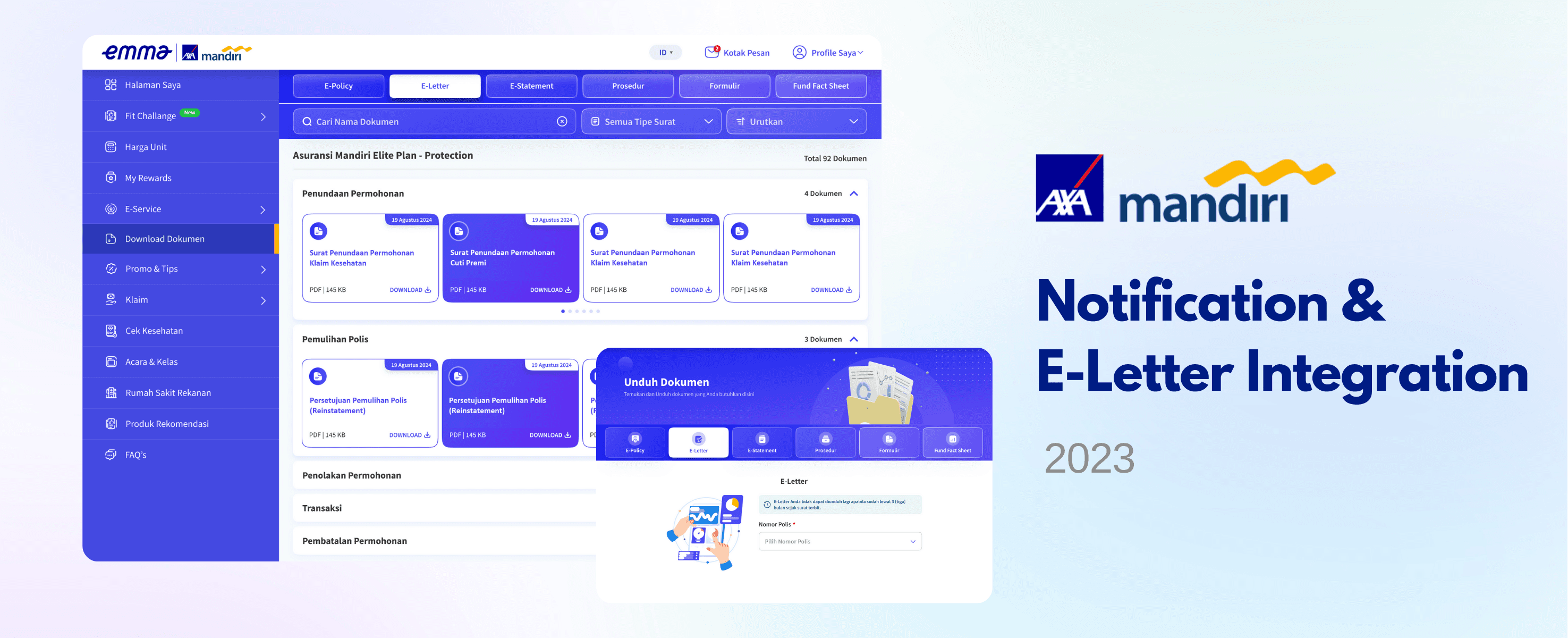
Emma AXA Mandiri, as a customer portal by AXA Mandiri, provides e-letter notifications and downloadable documents for users with customer and employee roles, as one of the layer broadcasting channels of AXA Mandiri.
Users are able to view notifications of their new e-letters and read the messages in the Emma Mailbox. If they do not download the documents directly, they are still able to access them from the 'Download Document' menu, categorized into E-Policy, E-Letter, E-Statement, Procedure, Form, and Fund Fact Sheet.
For E-Policy, E-Letter, and E-Statement, only users with customer or employee roles (with AXA Mandiri policies) are able to access them by entering their password, while guests without a policy are still able to download Procedure, Form, and Fund Fact Sheet documents.
Goals
Customers and employees are able to view notifications of their new letters on Emma AXA Mandiri and read the messages in the Emma Mailbox. Users can download the letters as PDF documents saved on their device (smartphone, laptop, PC, or tablet), or later access them through the ‘Download Document’ menu if not downloaded directly.
Emma AXA Mandiri, as one of the layer broadcasting channels (alongside SMS and email), receives documents from the mail management service (e-docs), including E-Policy, E-Letter, and E-Statement. These documents appear in real time on Emma, without waiting for SMS or email delivery (which usually takes 3–5 working days).
E-Policies are stored for 10 years until the policy lapses, while E-Letters and E-Statements are stored for 3 months from the issued date, following the e-docs database policy.
Key Responsibilities
Feature Development: Collaborated with the UI/UX and development teams to create the 'E-Letter Notification' on the My Page and 'Download Document' menu on the Emma AXA Mandiri.
Cross-Functional Coordination: Worked closely with internal teams who owned the letter to align letter categorization, messaging, content, and access to make sure actual information.
E-docs Integration and Messaging Optimization: API integrated with e-docs databases and optimize the messaging flow on the Emma AXA Mandiri platform so that it can be real-time.
Workflow
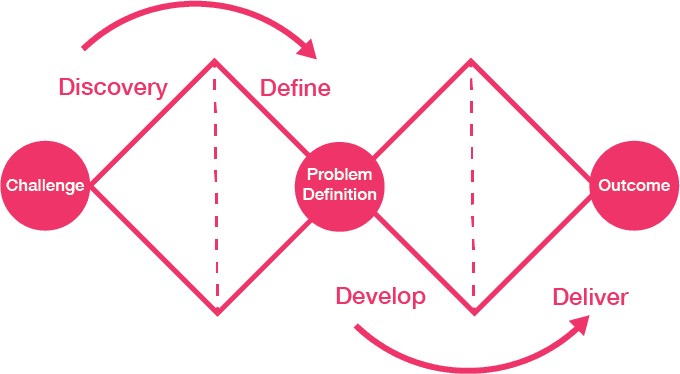
As a customer portal with various stakeholders and complex user needs, we use the Double Diamond Framework for developing the E-Letter Notification & Consolidated Download Document Menu on the Emma AXA Mandiri platform, along with design decision considerations. By following this structured Double Diamond Framework, Emma AXA Mandiri can deliver an E-Letter Notification & Consolidated Document Download feature that meets user needs for fast, organized, and secure document access directly within the platform.
01
Discover
User Research: Gather insights from users on current pain points with SMS and email-based notifications, specifically their challenges in accessing, organizing, and saving important documents.
Stakeholder Interviews: Engage with internal stakeholders to understand technical requirements, particularly for integrating with the e-docs API and ensuring smooth API communication for reliable document retrieval.
Benchmark Analysis: Review similar e-letter and document management solutions on other platforms to identify best practices and valuable features that enhance usability and accessibility.
02
Define
Pain Points
E-docs send E-Letter to the user by SMS or email, and it will be mixed with other messages received by the user.
Delayed access to documents via SMS and email, scattered document storage, and the inconvenience of downloading letters from multiple messages.
The E-Letter is not available on Emma yet, so we want to create a new notification and menu on the Emma AXA Mandiri platform.
User Personas
Users need quick access to consolidated documents and view their letter in real-time.
Users prefer easy-to-find documents stored in one accessible location.
Problem Statement
Users need an organized, accessible notification and document download system where they can quickly view and download letters in a consolidated menu, reducing reliance on fragmented SMS and email notifications.
03
Develop
Ideation
Brainstorm features like a real-time notification system, a clear inbox interface for e-letters, and a consolidated download menu where documents are easily accessible.
Decision Making
API Integration with E-docs: API integration approach that ensures secure and timely retrieval of documents from e-docs. Ensure that the API is designed to push notifications and documents efficiently into the platform without delay.
Real-time Notifications: Design notifications to alert users immediately when new letters are available, making it faster than SMS and email.
Secure Document Storage: Implement passwords for documents with personal data users, ensuring that sensitive information remains protected.
User-friendly Interface: Ensure the notification and document menu have an intuitive layout, enabling users to view, download, and organize their documents easily.
Provide Journey for Accessing Notifications and Downloading Letters from Mailbox
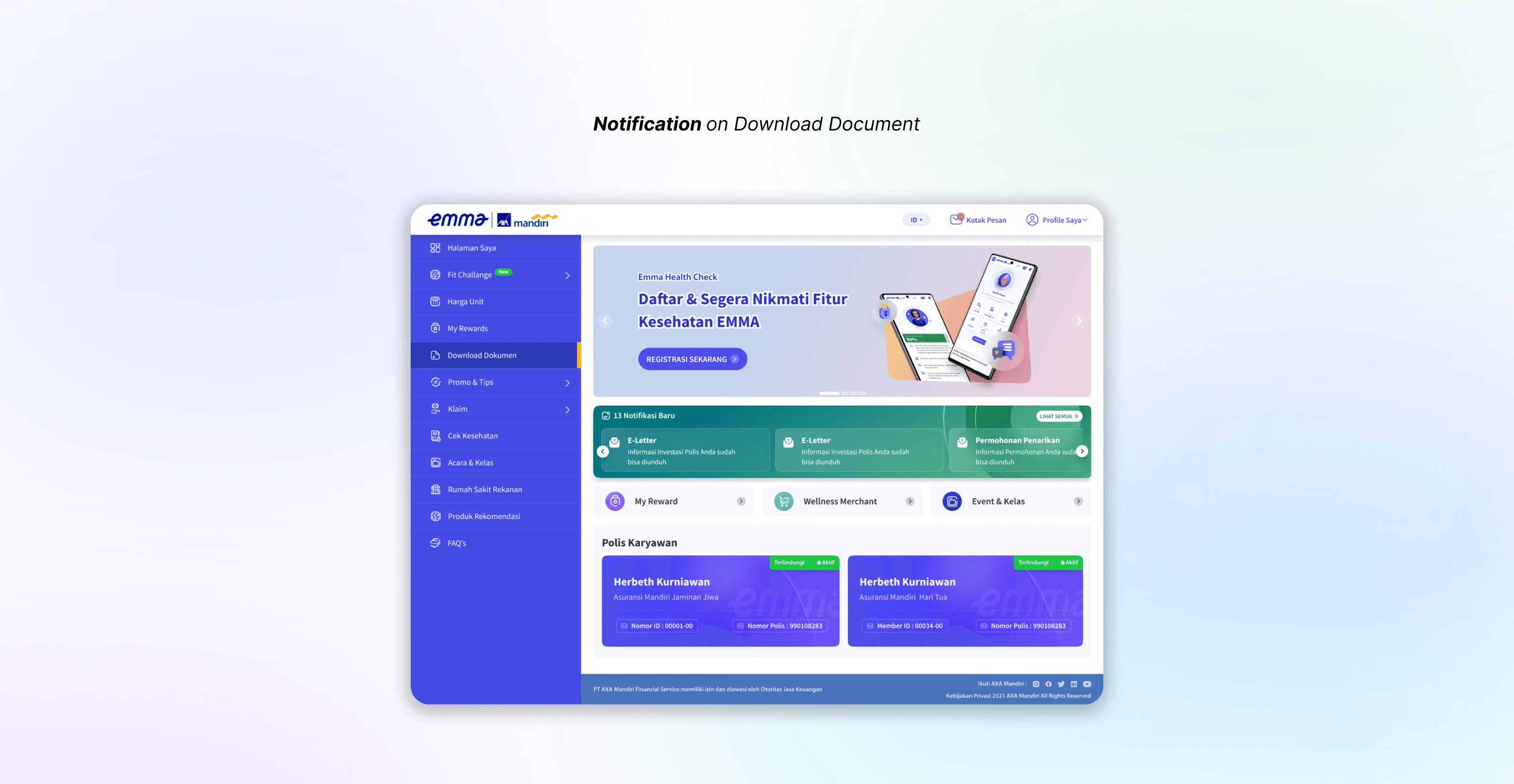
Design a new interface for letter notifications when users log in to Emma AXA Mandiri, ensuring they are aware of new letters (E-Policy, E-Statement, and E-Letter) without overwhelming them, even if they have multiple unread letters.
Requirement:Provide a notification with a new letter card on the Emma 'My Page', displaying letters that the user has not opened yet.
If users do not read or download the letter, the notification will remain visible to ensure they are aware of their unread letters.
If users have already read or downloaded the letter, the notification will no longer be shown.
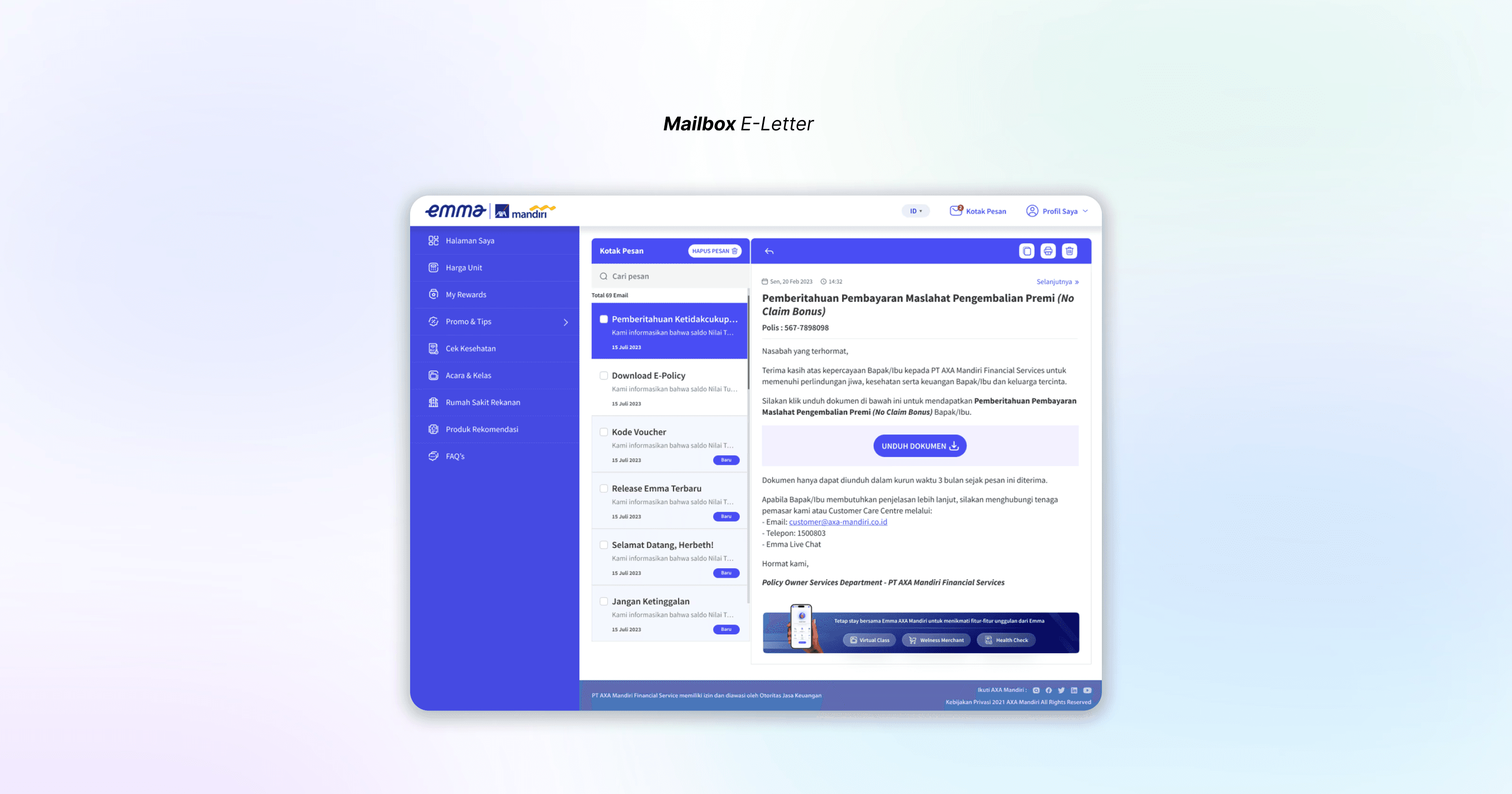
When users click the new letter card, they will be directed to the Mailbox. From there, they can read the message and download the letter.
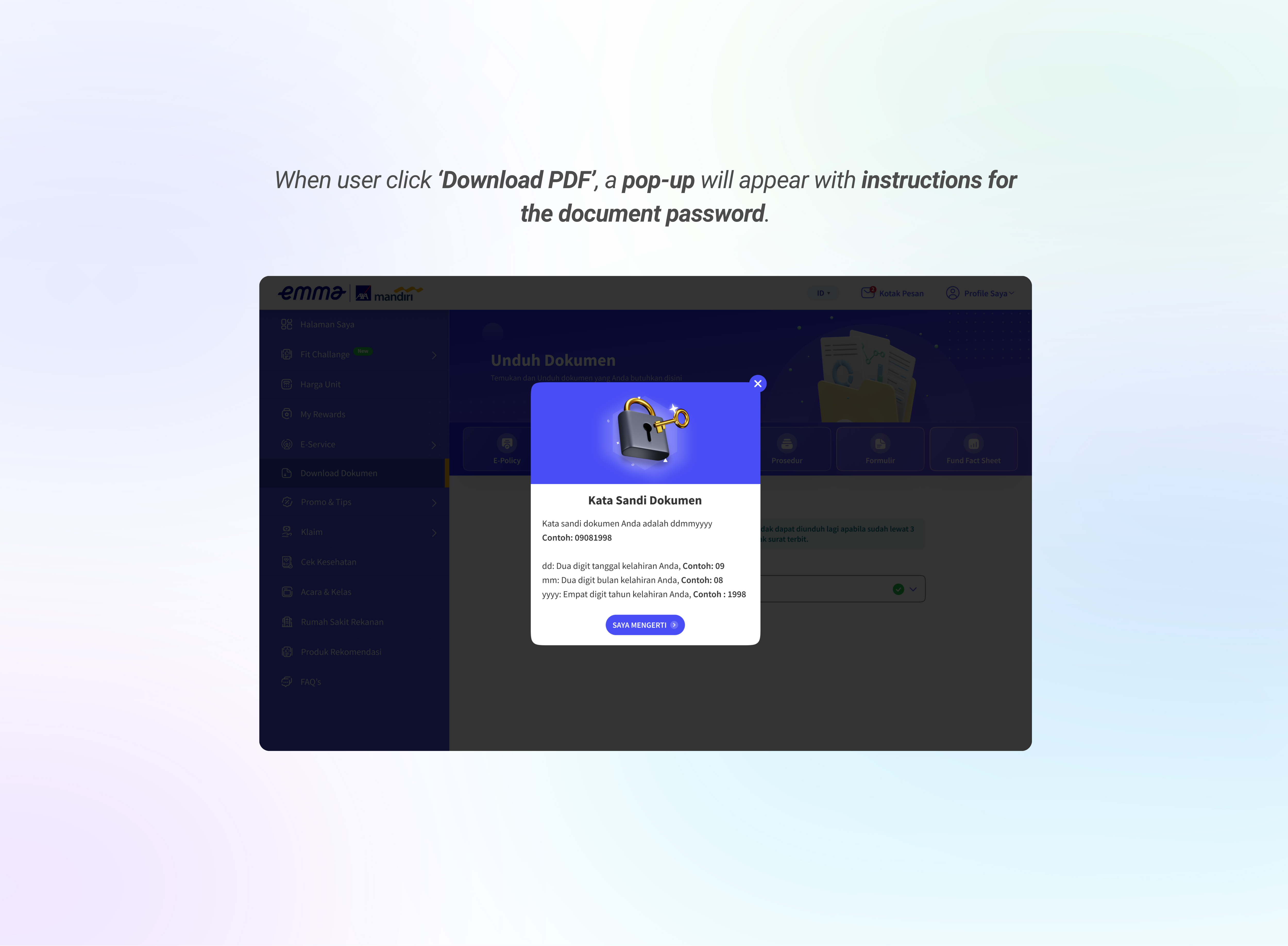
Users are able to download their letter by clicking the download button in the Mailbox. A password guidance pop-up will be displayed to guide them in entering the correct password combination.
All letters will be saved in the 'Download Document' menu. Users can access and download letters from this menu, which is organized by letter type for easy navigation.
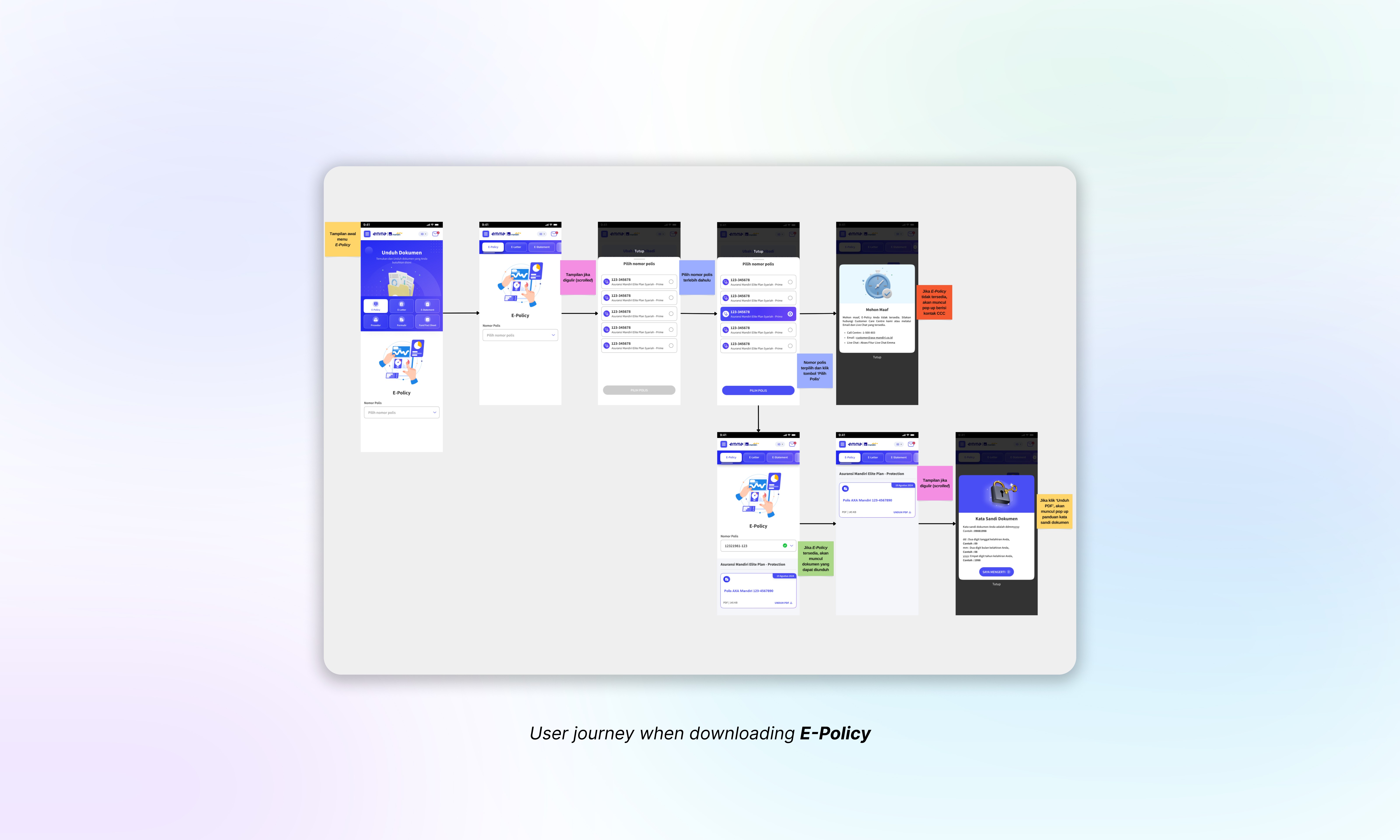
Provide Journey for Access and Download E-Policy
Enhance the wording and interface of the E-Policy page to provide a better user experience. Ensure users are aware that they can only download E-Policy letters within six months after the policy is issued and understand how to open them.
Requirement:Users are able to view a disclaimer and a policy dropdown on the E-Policy page, allowing them to select their policy.
Users are able to see their E-Policy displayed after selecting a policy, with the title and the issued date, as the system automatically loads the relevant document.
Users are able to download their E-Policy by clicking the download button. A password guidance pop-up will be displayed to guide them in entering the correct password combination.
Users are able to see a warning pop-up if the E-Policy is unavailable (e.g., if more than six months have passed since the policy was issued), including the contact information of Customer Centre for further assistance. The pop-up includes a close button, allowing users to dismiss it.
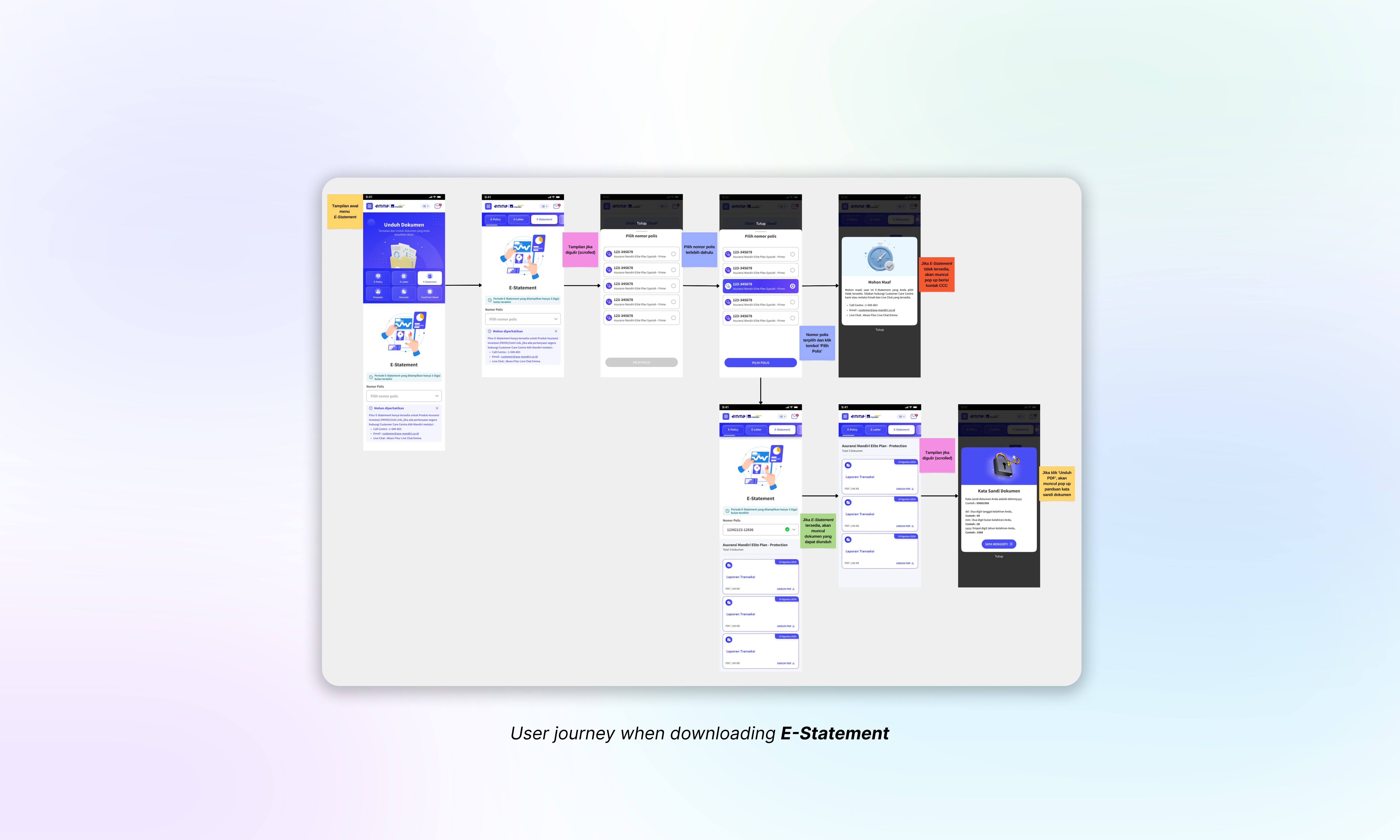
Provide Journey for Access and Download E-Statement
Enhance the wording and interface of the E-Statement page to provide a better user experience. Ensure users are aware that they can only download the last three months of statements and understand how to open them.
Requirement:Users are able to view a disclaimer that the letter is only available if they have a unit-link policy. If the user does not have a unit-link policy, the policy dropdown will not be shown. If the user does have a unit-link policy, the policy dropdown will be shown, allowing them to select their policy.
Users are able to see their E-Statement displayed after selecting a policy, with the title and the date of the statement, as the system automatically loads the relevant document.
Users are able to download their E-Statement by clicking the download button. A password guidance pop-up will be displayed to guide them in entering the correct password combination.
Users are able to see a warning pop-up if the E-Statement is unavailable (e.g., if the statement failed to generate or their policy has lapsed), including the contact information of Customer Centre for further assistance. The pop-up includes a close button, allowing users to dismiss it.
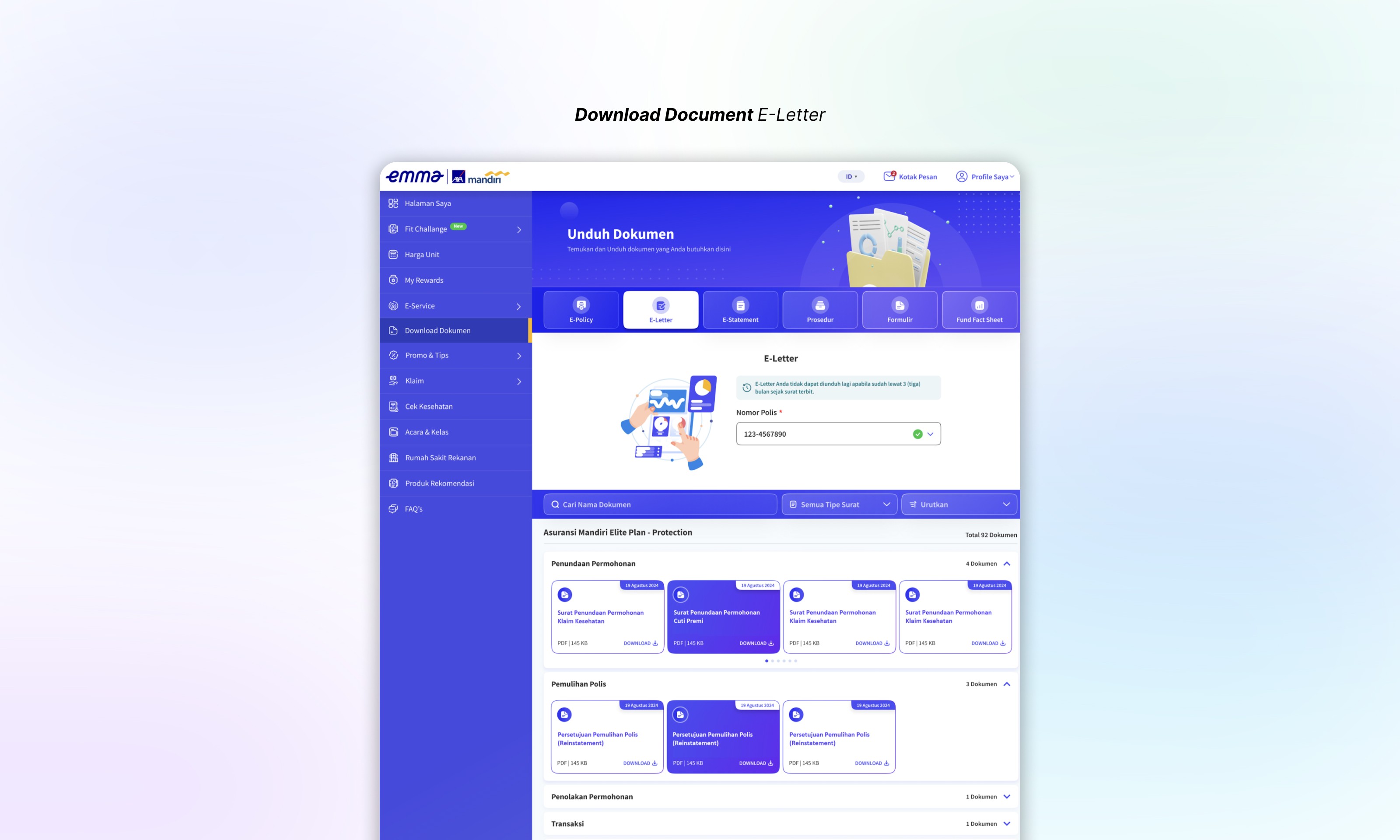
Provide Journey for Access and Download E-Letter
Enhance the wording and interface of the E-Letter page to provide a better user experience. Ensure users are aware that they can only download E-Letters within three months after issuance. Provide a user-friendly journey with features to search and filter letters, helping users easily locate their desired documents and understand how to open them.
Requirement:Users are able to view a disclaimer and a policy dropdown on the E-Letter page, allowing them to select their policy.
Users are able to see their E-Letter displayed after selecting a policy, with the title and the issued date, as the system automatically loads the relevant document.
Guidance pop-ups are provided for users when interacting with the E-Letter page, introducing the search and filter features. Users are able to search for letters using keywords, filter by type of letter, and sort by oldest or latest.
Users are able to download their E-Letter by clicking the download button. A password guidance pop-up will be displayed to guide them in entering the correct password combination.
Users are able to see a warning on the E-Letter page if the E-Letter is unavailable (e.g., if more than three months have passed since the letter was issued, the letter failed to generate, or the keyword/type of letter does not match any results).
Testing
Conduct usability testing with users to assess the ease of accessing and downloading letters and documents. Focus on users' ability to navigate the inbox and consolidated download menu intuitively.
04
Deliver
Development: Collaborate closely with the engineering team to build the notification system, inbox, and document download menu with secure API integration. Work on efficient error handling and robust backend support to manage document flow from e-docs.
Launch: Release the feature in phases, starting with a pilot to test the stability of API integration and gather feedback from users on document accessibility and organization.
Feedback Loop: Continuously monitor user engagement, document download statistics, and feedback to refine the feature. Consider further enhancements like document categorization and search capabilities within the download menu.
Result or Lesson Learned
Financial Advisor and Customer Care Centre will be promoted Emma AXA Mandiri for customers or employees that want to access their letter or document.
As a core function feature, potentially increase the platform usage, both for new members and existing members of AXA Mandiri to access their letter and various documents.
Provide a structured library for letter and document, based on the users need and can be accessed anywhere and anytime.